

Most AI video tools ask you to become a video editor. HeyGen asks you to write. You type a script, pick an avatar that looks and sounds like a real person, and a few minutes later you have a talking-head video that would otherwise need a camera, a studio light, a microphone, and a willingness to be on screen. That single shift — from editing timelines to writing text — is why HeyGen has become the default AI video generator for marketing teams, course creators, and solo founders who hate filming.
But “easy” and “worth paying for” are two different claims. This review covers what HeyGen actually does in 2026, what each plan really costs once credits are factored in, where it beats Synthesia and Descript, and — just as important — the three situations where I would tell you to spend your money somewhere else.
Last Updated: September 15, 2026
| Category | Summary |
|---|---|
| Best for | Marketers, course creators, and faceless-channel builders who want talking-head video without filming |
| Starting price | Free plan available; Creator from $24/mo billed annually ($29 monthly) |
| Standout feature | Avatar V realism plus one-click video translation into 175+ languages |
| Learning curve | Low — if you can write a script and use Google Docs, you can use HeyGen |
| Biggest weakness | Credit system punishes re-renders; costs climb with premium voices and 4K |
| Free trial | Yes — free plan with 3 videos per month (1 minute each, watermarked) |
What Is HeyGen?
HeyGen is an AI video generation platform built around digital avatars. Instead of recording yourself, you choose a stock avatar from a library of 500+ presenters, create a custom avatar from a two-minute phone recording of yourself, or turn a single photo into a talking presenter. You then paste a script, pick a voice, and HeyGen renders a video in which the avatar speaks your words with synced lips, natural pauses, and hand gestures.
The company reports more than 30 million users and customers in 196 countries, and says 85% of Fortune 100 companies use the platform in some form. On G2 it holds a 4.8/5 rating from over 1,000 reviews and is ranked first for avatar realism. Trustpilot is more mixed — a 3.8/5 TrustScore across roughly 3,400 reviews, with complaints clustered around billing and credit expectations rather than output quality. That split is worth knowing before you subscribe, and I will come back to it in the cons section.
Practically speaking, HeyGen covers four jobs: making avatar videos from a script, cloning your own face and voice, translating existing videos into other languages, and generating interactive or API-driven video at scale. Most people buy it for the first two and end up using the third more than they expected.
Inside HeyGen’s AI Studio
The editor is where HeyGen separates itself from traditional video software. Your script sits on the left; the scene sits on the right. Change a sentence and the delivery changes. There is no timeline to scrub, no keyframes, no waveform to trim — editing video works the way editing a document works.
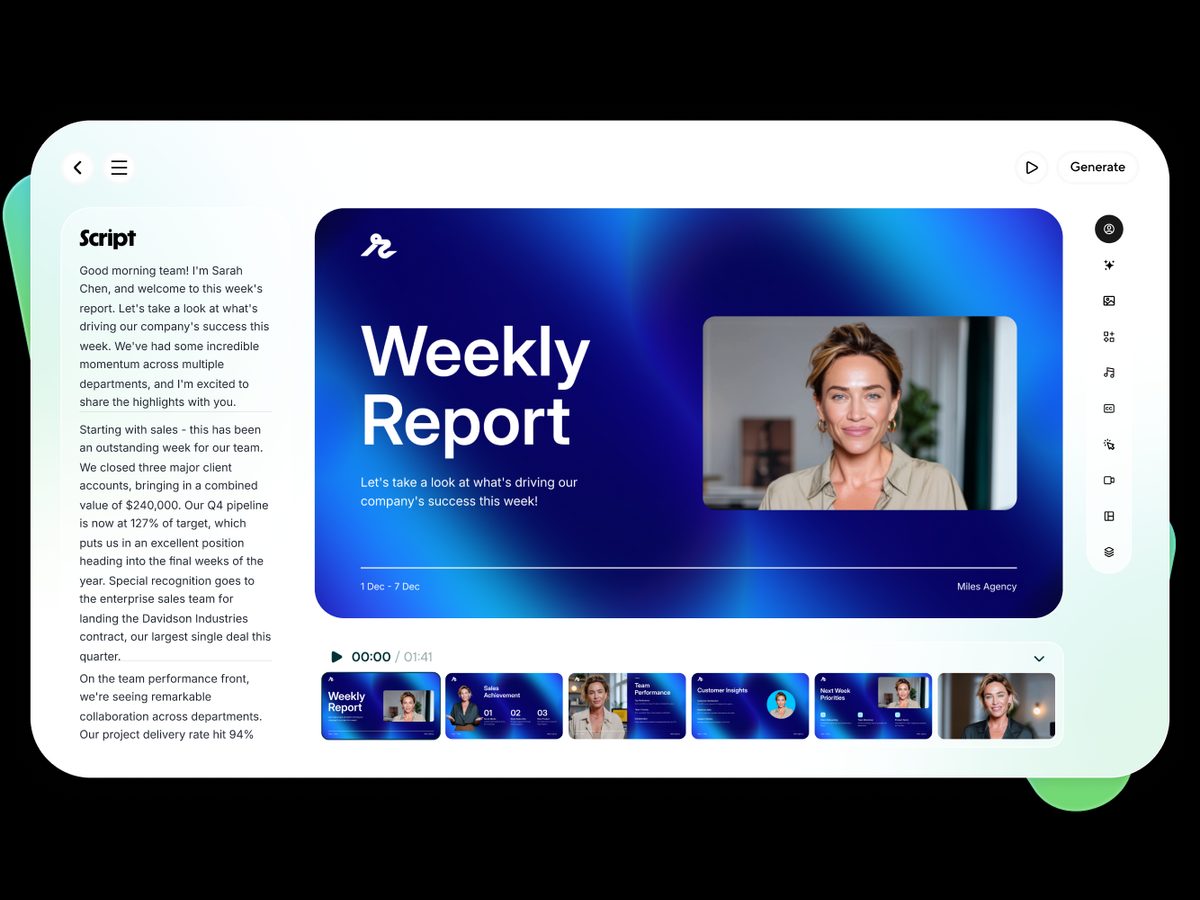
That design has a real business consequence. A marketer can update a product video because the price changed by editing one line and re-rendering, instead of rebooking a shoot. A course creator can fix a mistake in lesson 14 without re-recording lesson 14. This is the single biggest reason teams stay subscribed after the novelty wears off.
Key Features of HeyGen
Avatar V: The Realism Upgrade
Avatar V is HeyGen’s current-generation avatar model, and it is the feature that makes the tool worth a look even if you tried AI video two years ago and hated it. The improvement is not just sharper pixels — it is identity consistency (your avatar looks like the same person from clip to clip), better micro-expressions, and gestures that land on the right words instead of looping generically. Earlier models like Avatar IV are still available and remain usable on the free plan.
Custom Avatars and Photo Avatars
You can create a custom avatar from a short video recorded on a phone, which HeyGen then verifies before activating — the platform requires consent verification for every likeness, which is one of the reasons enterprises trust it. If you do not want to record anything at all, photo avatars turn a single still image into a talking presenter, and paid plans allow unlimited photo avatars. Studio-grade avatars filmed in a controlled setting are available too, but those are a paid add-on rather than something included in a $29 subscription.
Voice Cloning and Voice Director
HeyGen can clone your voice from a short sample, so the avatar sounds like you rather than a stock narrator. The bigger day-to-day upgrade is Voice Director: instead of re-recording to change tone, you tell the system how a line should be delivered — more urgent here, warmer there — and the read changes.

Video Translation into 175+ Languages
Upload an existing video and HeyGen will translate it, clone the original speaker’s voice into the target language, and re-sync the lips so the mouth matches the new audio. For anyone with a library of English content and an audience outside the US, this is the highest-leverage feature on the platform: a video that took a week to produce can serve ten markets by the end of the afternoon. Translation consumes credits per language based on source length, so plan your batches.
Gesture and Motion Control
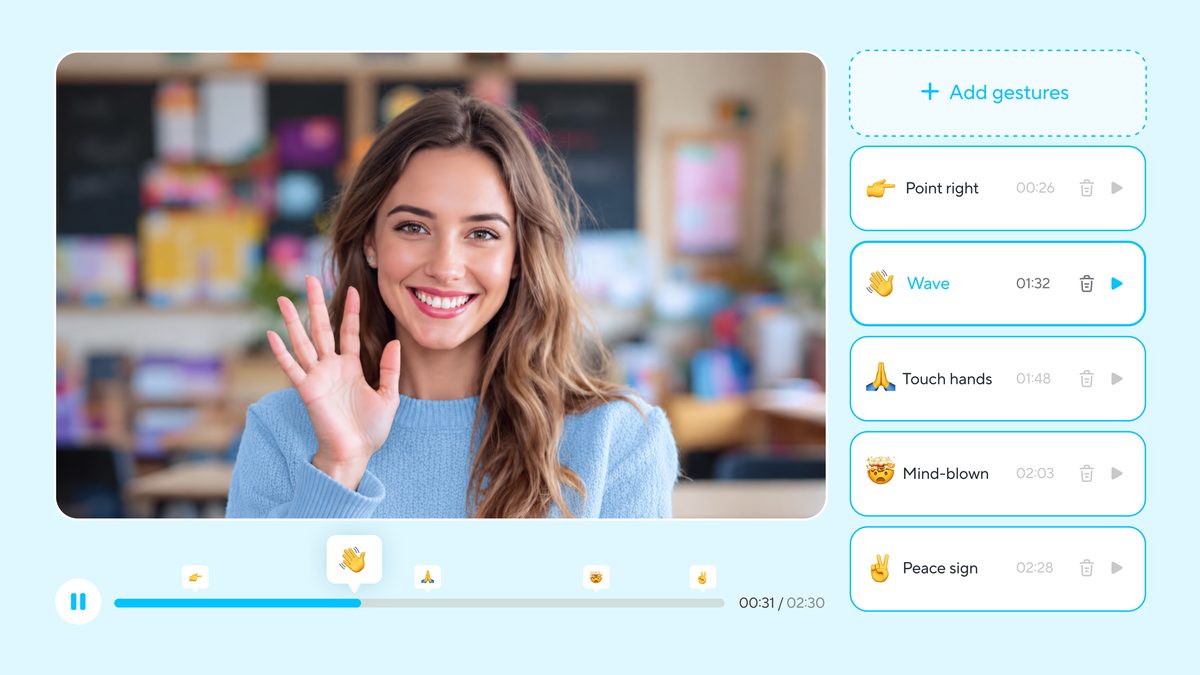
Long-form avatar video fails when the presenter stands frozen. HeyGen now lets you add gestures at specific points in the script — pointing, open-handed emphasis, a nod — so a three-minute explainer does not feel like a hostage video.
Interactive Avatars and LiveAvatar
Beyond pre-rendered clips, HeyGen supports real-time interactive avatars that can hold a conversation — useful for product demos, onboarding kiosks, AI tutors, and sales assistants. This sits on business-tier plans and the API, and it is the area where HeyGen is furthest ahead of tools built purely for marketing clips.
Video Agent, PPT-to-Video, and Repurposing
Video Agent turns a prompt or an existing asset into a finished video with scenes, captions, B-roll, and music already assembled. PPT and PDF conversion turns a deck into narrated video — a genuine time-saver for training teams. There are also standard creator utilities: auto-captions, lip sync for existing footage, dubbing, and motion graphics.
API and Integrations
HeyGen reports over a million developers using its API, and the platform connects to Zapier, Make, n8n, and HubSpot. The practical use case: personalized video at scale — one template, thousands of variants, each addressing a prospect by name. Business plans add SSO, workspace collaboration, and SCORM export for LMS delivery.
HeyGen Pricing (All Tiers)
| Plan | Price | Credits / Limits | Best For |
|---|---|---|---|
| Free | $0 | 3 videos/month, 1 min max, watermarked, 1 custom avatar | Testing whether avatar video fits your content |
| Creator | $24/mo annual, $29 monthly | 600 credits/mo, videos up to 30 min, no watermark, voice cloning | Solo creators, faceless channels, small e-commerce brands |
| Pro | $49/mo | 1,000 credits/mo, 4K export, faster processing, advanced models | Full-time creators and freelancers shipping weekly video |
| Business | $149/mo + $20/seat | 1,500 credits/mo, videos up to 60 min, 5+ custom avatars, SSO, SCORM, interactive video | Marketing, L&D, and agency teams |
| Enterprise | Custom | Flexible credits, no length cap, 10+ avatars, dedicated support | Large orgs with security and multi-workspace needs |
How credits work: as a rule of thumb, one credit renders roughly one minute of standard avatar video. The rate shifts with premium voices, higher resolutions, and translation, and — this is the part that surprises people — a re-render costs full price. Fix one typo after rendering and you pay for that minute twice. The practical discipline is simple: proofread the script before you hit generate, and render in short segments rather than one 10-minute take.
Pros: Where HeyGen Earns Its Price
Avatar quality is genuinely ahead of the field. This is subjective until you compare side by side, at which point it stops being subjective. Skin, eye movement, and mouth shapes hold up at full screen, and Avatar V keeps the same face consistent across a whole series.
The learning curve is nearly flat. Writing replaces editing. Most people publish their first usable video within an hour of signing up, which matters more than any feature list if the alternative is a tool you never open.
Translation turns one asset into ten. Matched voice and lip-sync across 175+ languages is the closest thing to free distribution leverage in content marketing right now.
You can test it for free. Three watermarked one-minute videos are enough to answer the real question: does an avatar version of your message hold attention, or does your audience bounce?
It scales past the solo creator. API, SSO, SCORM export, and interactive avatars mean you will not outgrow the platform if your one-person channel becomes a five-person content team.
Cons: What You Should Know Before Subscribing
Credits run out faster than you expect. The pricing looks cheap until you count re-renders, translations, and premium voices. Budget for roughly double your naive estimate in month one while you learn the workflow, then expect it to settle.
Premium extras are metered. Higher-end voices and 4K output consume credits faster, so the sticker price of a plan is not the whole cost picture. Check the current credit rates before committing to a heavy production schedule.
Studio-grade custom avatars cost extra. The phone-recorded custom avatar included in paid plans is good. The premium studio avatar is better — and is a separate paid add-on, not part of a $29 plan.
Emotional range still has a ceiling. For explainers, ads, training, and product updates, output is excellent. For storytelling that lives on vulnerability or comedic timing, a real camera still wins.
Billing complaints are the common thread in negative reviews. HeyGen’s Trustpilot score sits at 3.8/5, noticeably below its 4.8/5 on G2, and the recurring theme is subscription and credit expectations rather than video quality. Start on the free plan, choose monthly before annual if you are unsure, and read the plan limits before upgrading.
HeyGen vs Synthesia vs Descript
| HeyGen | Synthesia | Descript | |
|---|---|---|---|
| Core strength | Avatar realism + translation | Enterprise training video | Editing real footage and podcasts |
| Entry price | Free; $24/mo annual | Free tier; $18/mo annual | Free tier; paid plans for real exports |
| Volume model | Credits (~1 min per credit) | Minutes per month (10 min on Starter, 30 on Creator) | Transcription hours |
| Translation | 175+ languages with lip-sync | Strong, 160+ languages | Limited |
| Choose it if | You want the most human-looking avatar and global reach | You need corporate L&D at scale with generous minute caps | You already film yourself and want faster editing |
The honest summary: Synthesia’s minute-based plans are easier to forecast for training departments, and Descript is the better buy if you actually enjoy being on camera. HeyGen wins when the avatar has to look convincingly human and when one video needs to work in many languages.
Who Should Use HeyGen
Creators who will not go on camera. If the reason your channel does not exist is that you hate filming, HeyGen removes that excuse entirely — your writing becomes the product.
Marketers shipping volume. Ad variants, landing-page explainers, product updates, and localized versions of all three, without booking a studio.
Course creators and training teams. Lessons you can correct by editing text, exported to an LMS with SCORM on business plans.
Anyone with an audience outside their own language. Translation with cloned voice is the feature that pays for the subscription by itself.
Who should skip it: vloggers whose whole appeal is their real presence, anyone producing cinematic narrative work, and creators publishing so infrequently that a free tool plus a phone camera covers the need.
How to Get Started in Under an Hour
1. Sign up for the free plan and render one 60-second video before spending anything.
2. Write a tight script first — roughly 150 words per minute — and proofread it, because re-renders cost credits.
3. Pick a stock avatar to learn the workflow; create your custom avatar only after you know you will keep using the tool.
4. Add captions and one or two gestures at natural emphasis points.
5. Once one video performs, translate it into your two biggest secondary markets and measure the difference.
Final Verdict
HeyGen is the strongest all-round AI avatar video platform available in 2026. The avatars look real enough for paid ads, the editor is simple enough that writing is the only skill required, and the translation engine turns a single asset into a global one. The credit system deserves respect — it rewards preparation and punishes sloppy first drafts — and the premium extras add up if you are careless. But for anyone who wants to publish video consistently without ever standing in front of a camera, nothing else currently delivers the same combination of realism, speed, and reach.
Start on the free plan, render one video, and judge it against your own content. That test costs nothing and answers the question faster than any review can.
Frequently Asked Questions
Is HeyGen free to use?
Yes. The free plan allows three videos per month, up to one minute each, with a watermark and access to stock avatars plus one custom avatar. It is enough to test quality and workflow before paying.
How much does HeyGen cost?
Creator is $24/month billed annually or $29 billed monthly with 600 credits. Pro is $49/month with 1,000 credits and 4K export. Business starts at $149/month plus $20 per seat with 1,500 credits, and Enterprise is custom-priced.
How many minutes of video does one credit make?
Roughly one minute of standard avatar video per credit. Premium voices, higher resolutions, and translations consume credits faster, and every re-render is charged again in full.
Can HeyGen clone my face and voice?
Yes. You can create a custom avatar from a short recording and clone your voice from an audio sample. HeyGen requires consent verification before a likeness can be used, which is how it blocks avatars made from someone else’s footage.
How good is HeyGen’s video translation?
It translates into 175+ languages and dialects, keeps the speaker’s cloned voice, and re-syncs lip movement to the new audio. It is one of the most convincing implementations available, though you should still have a native speaker review anything high-stakes.
Is HeyGen better than Synthesia?
For avatar realism and multilingual reach, HeyGen generally has the edge. For corporate training teams that want predictable minute-based allowances and deep LMS workflows, Synthesia remains a strong alternative. Both offer free tiers, so testing the same script in each is the fastest way to decide.
Can I use HeyGen videos commercially?
Yes — paid plans remove the watermark and allow commercial use, including ads, YouTube, courses, and client work. Check the current terms for your specific plan if you are reselling video production as a service.
Disclosure: This post contains affiliate links. We may earn a commission if you sign up through our links, at no extra cost to you.