

Most “AI writing tools” try to write everything for you — QuillBot takes the opposite approach. It’s built to refine what you’ve already written: rephrasing awkward sentences, fixing grammar, shortening long paragraphs, and checking for AI-generated or plagiarized text, all without replacing your own voice. Started as a paraphrasing tool and now expanded into a full writing suite (grammar checker, summarizer, AI detector, translator, and more), QuillBot is used by over 35 million writers worldwide. This review breaks down exactly what QuillBot does, real pricing across every tier, honest pros and cons, and how it compares to Grammarly and Wordtune — so you can decide with real information instead of marketing copy.
Last Updated: September 14, 2026
| Category | Summary |
|---|---|
| Best for | Students, non-native English writers, professionals, and content creators refining their own writing |
| Free version | Usable — 125-word paraphraser, basic grammar fixes, limited AI detector and chat |
| Premium starts at | Around $8.33/month, billed annually |
| Main competitors | Grammarly, Wordtune, ProWritingAid |
What Is QuillBot?
QuillBot is an AI-powered writing platform built around one core idea: help you say what you already mean, more clearly — rather than generating content from scratch. It started as a dedicated paraphrasing tool and has since expanded into a full writing suite covering grammar checking, summarizing, AI humanization, plagiarism/AI detection, citation generation, translation, and even basic AI chat, image generation, and PDF tools.
QuillBot reports over 35 million writers using the platform across 180+ countries, with 140+ partner educational institutions and a Chrome extension used by 6+ million people (rated 4.7/5). It’s available as a web app, browser extension (Chrome, Edge, Safari), and native integration inside Microsoft Word, alongside iOS, Android, macOS, and Windows apps.
Inside QuillBot’s Writing Studio
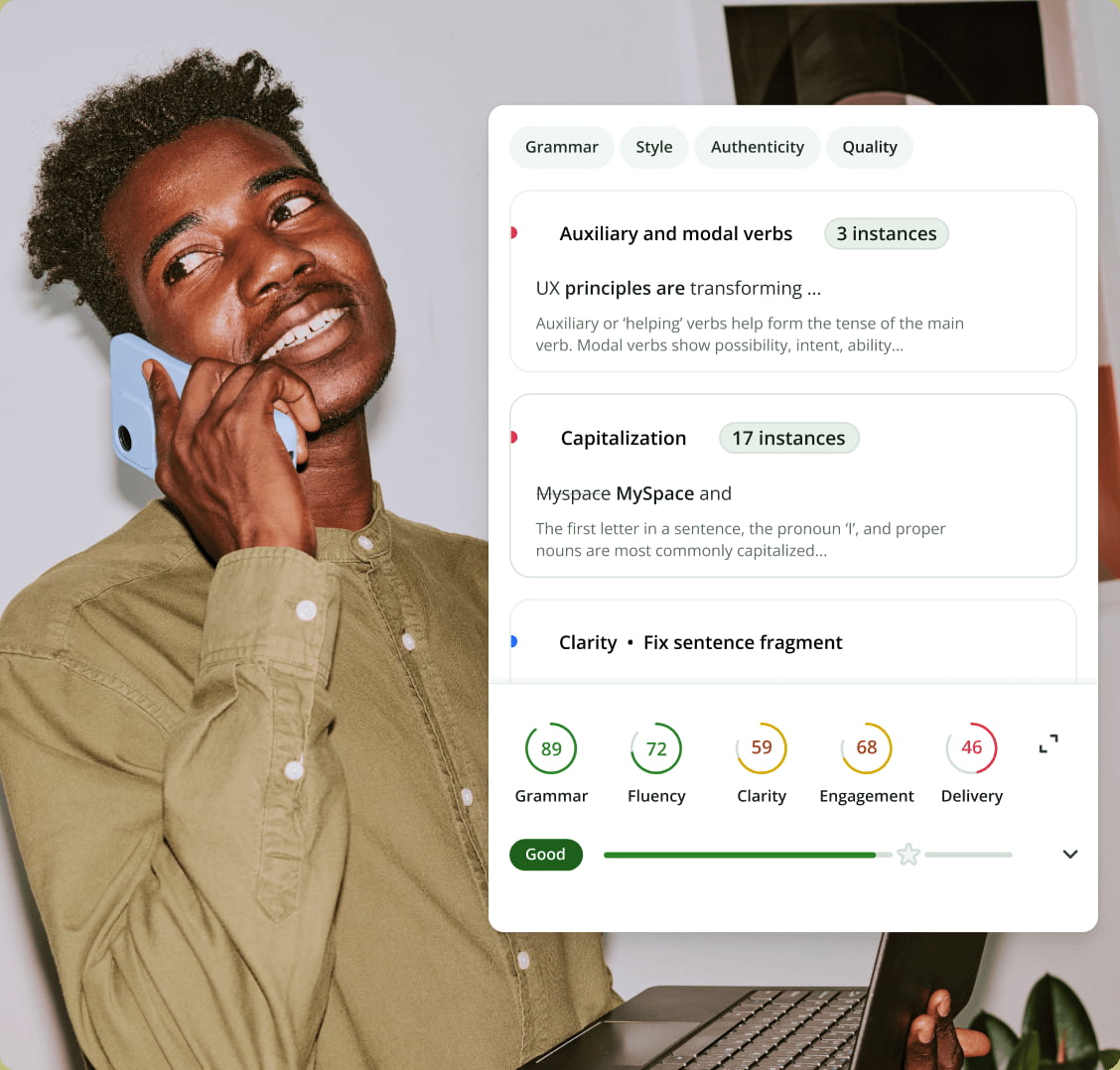
Below is QuillBot’s actual writing feedback interface — as you write or paste text, it scores Grammar, Fluency, Clarity, Engagement, and Delivery, then flags specific issues (like capitalization or sentence fragments) with plain-language explanations you can apply with one click.
Key Features of QuillBot
Paraphraser (9 Writing Modes)
QuillBot’s original and still most-used tool rewrites text in one of nine modes — Standard, Fluency, Formal, Academic, Simple, Creative, Expand, Shorten, and Custom — plus a synonym slider and “Freeze Words” to lock specific terms (brand names, technical terms) that shouldn’t be changed during rephrasing.
Grammar Checker
Beyond basic spelling and grammar fixes, QuillBot scores writing across five dimensions — Grammar, Fluency, Clarity, Engagement, and Delivery — with specific, plain-language explanations for each flagged issue rather than just a red underline.
AI Humanizer
Rewrites AI-generated text to read more naturally and reduce detectability by AI-content detectors — useful for anyone editing AI-drafted content into something that reads like it was written by a person.
Summarizer
Condenses long text, articles, or documents into key points or a short paragraph, with adjustable length and a choice between bullet-point and paragraph summary formats.
AI Detector and Plagiarism Checker
Scans text to flag likely AI-generated content and checks against online sources for potential plagiarism, both useful for students and educators, and for anyone who needs to verify originality before publishing or submitting work.
Citation Generator
Automatically generates citations in APA, MLA, Chicago, and other common academic formats from a URL, DOI, or manual entry — a smaller feature but a genuine time-saver for academic writing.
Translator, AI Chat, and Extras
QuillBot also includes a multilingual translator, a general-purpose AI chat tool, a basic AI image generator, a presentation maker, and a set of PDF tools (chat with PDF, merge, split, convert) — extending the platform beyond pure text editing into a broader “AI subscription” as QuillBot positions it.
QuillBot Pricing (All Tiers)
| Plan | Price | Best For |
|---|---|---|
| Free | $0 | Occasional use — 125-word paraphraser, basic grammar fixes, 1,200-word summarizer |
| Premium (Monthly) | $19.95/month | Trying Premium short-term without a longer commitment |
| Premium (Semi-Annual) | $79.95 every 6 months (~$13.32/month) | Regular users wanting a mid-length commitment |
| Premium (Annual) | $99.95/year (~$8.33/month) | Students, professionals, and daily writers — the best per-month value |
| Team | Custom | Organizations needing shared billing, usage metrics, and admin controls |
Premium unlocks unlimited-length paraphrasing, all 9 writing modes, full AI humanizer access, a 6,000-word summarizer, full AI detector access, 25,000 words/month of plagiarism checking, more AI chat and image generation, and faster processing. QuillBot offers a 3-day money-back guarantee and a subscription pause option. Always confirm current pricing on QuillBot’s official pricing page before purchasing, as SaaS pricing changes periodically.
Pros: Why QuillBot Is Worth Trying
QuillBot’s paraphraser remains one of the most capable on the market — nine distinct modes plus custom controls give far more nuance than a single “rewrite this” button, and the Freeze Words feature is a genuinely useful detail for keeping brand names and technical terms intact. The five-dimension writing score (Grammar, Fluency, Clarity, Engagement, Delivery) gives more actionable feedback than a simple error count, and the free plan is generous enough to be useful before paying anything. Annual Premium pricing (~$8.33/month) is notably cheaper than most direct competitors, and cross-platform support — Word, Google Docs, Chrome, mobile apps — means it fits into an existing writing workflow rather than requiring a new one.
Cons: What to Watch Out For
The free plan’s 125-word paraphrasing limit is quite restrictive for anything beyond quick single-sentence edits, pushing serious users toward Premium fairly quickly. Like all AI paraphrasing tools, QuillBot can occasionally misread context and produce a rephrase that’s technically grammatical but changes the intended meaning — output should always be reviewed, not blindly trusted, especially for professional or academic work. It’s also less reliable on highly technical or niche-industry content where precise terminology matters, and monthly billing at $19.95 is considerably more expensive than committing to the annual plan.
QuillBot vs. the Competition
QuillBot vs. Grammarly
Grammarly leans more heavily into grammar/style correction and tone detection with a strong enterprise and team offering, while QuillBot’s core strength is paraphrasing depth — more rewriting modes and finer control over how text gets rephrased. Many writers actually use both: Grammarly for catching errors, QuillBot for restructuring sentences.
QuillBot vs. Wordtune
Wordtune offers a similar rewrite-suggestions approach with a clean, minimal interface, but QuillBot’s broader toolset (summarizer, citation generator, plagiarism/AI detector, translator) makes it more of an all-in-one writing suite rather than a single-purpose rewriting tool.
QuillBot vs. ProWritingAid
ProWritingAid targets long-form writers (novelists, technical writers) with deep style reports and readability analytics, appealing more to those editing large manuscripts. QuillBot is faster and simpler for everyday paraphrasing, grammar checks, and shorter-form academic or professional writing.
Who Should Use QuillBot?
QuillBot is a strong fit for students writing essays and research papers, non-native English speakers wanting a natural-sounding second pass on their writing, professionals refining emails and reports, and content creators who want to vary sentence structure and tone quickly. It’s less necessary for writers who need deep, long-manuscript style analytics (where ProWritingAid specializes) or teams needing a heavy enterprise-grade style guide enforcement tool.
Is QuillBot Worth It in 2026?
With one of the most capable paraphrasers available, a genuinely useful free tier, an expanding toolset (summarizer, AI detector, citation generator, translator), and Premium pricing that undercuts most direct competitors on an annual basis, QuillBot remains one of the better all-around AI writing assistants in 2026 — particularly for students and professionals who want to improve their own writing rather than have an AI write for them.
Frequently Asked Questions
Is QuillBot free to use?
Yes — the free plan includes a 125-word paraphraser, basic grammar fixes, a 1,200-word summarizer, and limited AI detector and chat access, with no time limit on how long you can use it.
Is QuillBot safe for academic use?
QuillBot is a writing aid, similar to a grammar checker or thesaurus — most institutions treat rephrasing your own writing as acceptable, but always check your specific school or publisher’s AI-tool policy, especially since QuillBot’s own AI detector can flag heavily AI-rewritten text.
Does QuillBot work in Google Docs and Word?
Yes — QuillBot offers a Chrome extension (which also works inside Google Docs) and a native Microsoft Word add-in, alongside iOS, Android, macOS, and Windows apps.
What is QuillBot’s AI Humanizer?
It’s a tool that rewrites AI-generated text to sound more natural and reduce how easily it’s flagged by AI-content detectors — useful for editing AI-drafted content into something that reads as human-written.
Is QuillBot better than Grammarly?
They serve slightly different primary purposes — QuillBot is stronger for paraphrasing and rewriting with more mode variety, while Grammarly leans more into grammar/tone correction. Many users use both together rather than choosing one exclusively.
How much does QuillBot Premium cost?
Premium costs $19.95/month billed monthly, $79.95 every 6 months (~$13.32/month), or $99.95/year (~$8.33/month) — the annual plan offers the best per-month value.
Disclosure: This post contains affiliate links. We may earn a commission if you sign up through our links, at no extra cost to you.