

If your customers already message you on WhatsApp, chances are those conversations are scattered across someone’s personal phone — no history, no handoff, no automation. Wati fixes that by giving businesses official WhatsApp Business API access wrapped in a shared team inbox, no-code chatbots, broadcast campaigns, and an AI support agent — all built specifically around WhatsApp, Instagram, and Facebook Messenger. This review breaks down exactly what Wati does, real pricing across every tier, honest pros and cons, and how it compares to ManyChat and the official WhatsApp Business Platform — so you can decide with real information instead of marketing copy.
Last Updated: September 14, 2026
| Category | Summary |
|---|---|
| Best for | E-commerce, agencies, and support/sales teams that run customer conversations through WhatsApp |
| Free trial | 7 days free, no credit card required |
| Growth plan starts at | Around $29/month, billed annually |
| Main competitors | ManyChat, official WhatsApp Business Platform, Twilio, Zoko |
What Is Wati?
Wati is a customer engagement platform built on top of the official WhatsApp Business API, designed to help marketing, sales, and support teams manage WhatsApp (plus Instagram and Facebook Messenger) conversations at scale from one shared inbox. Instead of running WhatsApp from a single phone, Wati gives a whole team access to the same business number, with chatbots, automation, broadcast campaigns, and an AI support agent layered on top.
Because it’s built directly on Meta’s official API, messages sent through Wati carry the same trust signals as a verified business (green checkmark eligibility, higher messaging limits) — something that isn’t possible with WhatsApp Business App workarounds or unofficial tools. Wati reports 16,000+ businesses across 190+ countries using the platform, with over 10 billion messages processed.
Inside Wati’s Team Inbox
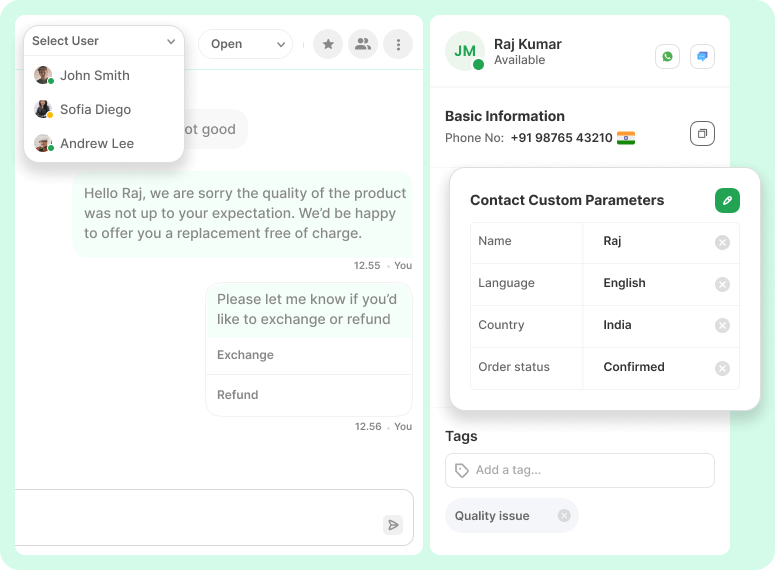
Below is Wati’s actual Team Inbox interface — agents can see full conversation history, assign chats to specific teammates, view custom contact parameters (order status, language, country), and trigger quick-reply buttons like “Exchange” or “Refund,” all from one shared view instead of a single phone.
Key Features of Wati
Official WhatsApp Business API
Wati is a Meta-verified Business Solution Provider, meaning your number connects through the official WhatsApp Business API rather than an unofficial workaround — this unlocks green-tick verification eligibility, multi-agent access, and much higher messaging limits than the free WhatsApp Business App.
Shared Team Inbox
Multiple agents can work from the same WhatsApp number at once, with conversations assignable to specific teammates, internal notes, tags, and full customer history visible to whoever picks up the chat — eliminating the “one phone, one person” bottleneck.
No-Code Chatbot Builder
A visual flow builder lets you design automated conversation flows — FAQ answers, lead qualification, order status lookups — without writing code, and hand off to a human agent automatically when a conversation needs one.
AI Support Agent
Wati’s AI Support Agent can resolve a large share of repetitive customer questions automatically by pulling from a built-in knowledge base, reducing the load on human agents while keeping response times fast around the clock.
Broadcast Campaigns
Send personalized, permission-based WhatsApp broadcast campaigns to segmented contact lists — promotions, order updates, re-engagement messages — with delivery optimized to stay within WhatsApp’s messaging policies.
Click-to-WhatsApp Ads and Instagram Automation
Wati connects directly to Click-to-WhatsApp ad campaigns so ad clicks land in a structured chat flow instead of a cold inbox, and extends similar automation to Instagram DMs and comments for lead capture.
100+ Integrations
Native integrations with Shopify, WooCommerce, HubSpot, Salesforce, Zoho CRM, and Zapier let Wati plug into an existing sales and support stack rather than becoming a walled-off tool on its own.
Wati Pricing (All Tiers)
| Plan | Price (billed annually) | Best For |
|---|---|---|
| Growth | ~$29/month | Small teams starting out — 3 users, 15,000 broadcasts/month, 1,000 automation triggers |
| Pro | ~$99/month | Growing teams — 5 users, unlimited broadcasts, advanced chatbots, Instagram automation |
| Business | ~$249/month | Higher-volume teams — unlimited integrations, SMS fallback, dedicated account manager |
| Enterprise | Custom | Large organizations needing custom volume, SLAs, and account management |
On top of the subscription fee, WhatsApp itself charges Meta’s own per-conversation fees (varying by country and message category — marketing, utility, or authentication), which apply on every WhatsApp Business API platform, not just Wati. Extra users beyond each plan’s included seats cost extra per month. A 7-day free trial with no credit card is available on every plan — always confirm current pricing on Wati’s official pricing page before purchasing, as SaaS pricing changes periodically.
Pros: Why Wati Is Worth Trying
Wati gives small and mid-sized teams enterprise-grade WhatsApp infrastructure — official API access, multi-agent inbox, automation, and AI support — without needing to build any of it from scratch or negotiate directly with Meta’s Business Solution Providers. The no-code chatbot builder and AI Support Agent meaningfully cut down repetitive manual replies, and native integrations with Shopify, HubSpot, and Salesforce mean it slots into an existing workflow rather than replacing it. For any business already doing real sales or support volume over WhatsApp, the jump from a single phone to a structured shared inbox pays for itself quickly in fewer missed messages and faster response times.
Cons: What to Watch Out For
WhatsApp’s own per-conversation fees apply on top of the Wati subscription, so total cost depends on message volume and country — it’s worth estimating this before comparing plans purely by sticker price. There’s a real learning curve to get the most out of automation flows and integrations, especially for teams new to chatbot logic. Additional users beyond each plan’s included seats add ongoing cost, which can add up for larger support teams, and — like most platforms built on the official WhatsApp Business API — getting a new number verified and approved by Meta takes a bit of setup time compared to just installing the free WhatsApp Business App.
Wati vs. the Competition
Wati vs. ManyChat
ManyChat historically focused more on Instagram and Messenger automation with WhatsApp added later, while Wati was built WhatsApp-first from day one — its chatbot builder, broadcast tools, and team inbox are all designed specifically around WhatsApp Business API behavior and limits. Teams whose primary channel is WhatsApp tend to find Wati’s WhatsApp-specific features (like AI Support Agent and WhatsApp-native broadcast compliance) more mature.
Wati vs. the Official WhatsApp Business Platform (via Meta directly)
Going directly through Meta’s WhatsApp Business Platform means dealing with raw API access, webhooks, and no built-in interface — workable for a dev team building fully custom tooling, but impractical for most businesses. Wati sits on top of the same official API and adds the inbox, chatbot builder, broadcast tools, and integrations that would otherwise have to be built in-house.
Wati vs. Twilio
Twilio offers WhatsApp API access as part of a much broader communications platform (SMS, voice, email) aimed at developers who want to build custom messaging infrastructure. Wati is purpose-built for non-technical marketing, sales, and support teams who want a ready-to-use inbox and chatbot builder without writing integration code.
Who Should Use Wati?
Wati is a strong fit for e-commerce stores handling order updates and support over WhatsApp, agencies managing WhatsApp presence for multiple clients, and sales or support teams that want to move off a single shared phone onto a proper multi-agent inbox with automation. It’s less necessary for businesses with very low WhatsApp message volume, or teams that need a fully custom-built messaging system and have the engineering resources to build directly on Meta’s raw API.
Is Wati Worth It in 2026?
With WhatsApp remaining the dominant messaging channel across much of the world, official API access, a mature no-code chatbot builder, AI-assisted support, and 100+ integrations make Wati one of the more complete WhatsApp business platforms available in 2026 — particularly for teams that need multiple agents working from one number without building the infrastructure themselves.
Frequently Asked Questions
Is Wati free to use?
Wati offers a 7-day free trial with no credit card required on every plan, but there is no permanent free tier — paid plans start around $29/month billed annually.
Do I need a WhatsApp Business API approval to use Wati?
Yes. Wati, as a Meta-verified Business Solution Provider, handles most of the WhatsApp Business API setup and verification process for you during onboarding — you don’t need to apply to Meta directly yourself.
Does Wati charge per WhatsApp message?
WhatsApp itself (via Meta) charges per-conversation fees that vary by country and message category, on top of Wati’s own subscription price — this applies to any platform built on the official WhatsApp Business API, not just Wati.
Can I use Wati without coding?
Yes. The chatbot flow builder, broadcast campaigns, and team inbox are all designed to be used without writing code, though API/webhook access is available for teams that want deeper custom integrations.
Does Wati work with Instagram and Facebook Messenger?
Yes — alongside WhatsApp, Wati supports Instagram DM/comment automation and Facebook Messenger, managed from the same shared inbox.
How much does Wati cost?
Paid plans start around $29/month (Growth, billed annually) and scale up through Pro (~$99/month) and Business (~$249/month) based on users, automation triggers, and broadcast volume, with custom Enterprise pricing for large organizations.
Disclosure: This post contains affiliate links. We may earn a commission if you sign up through our links, at no extra cost to you.